How to add “Email Subscription Form” to Blogger Blogspot

Hi, berjumpa kembali, artikel ini akan membawakan tentang widgets hd How to add “Email Subscription Form” to Blogger Blogspot simak selengkapnya
When you are providing useful information in your blog, then many times some readers will need to get the latest updates from your blog. For that purpose, you need an Email Subscription Form in your blog, so that the interested visitors can easily get the latest updates.
Related: How to Burn Blogger RSS Feeds at Feedburner
To add email or Feed Subscription Form to your blogger blog (blogspot) is very easy.
Just follow the next steps:
1. Log in to Blogger, then go to Layout > click on "Add a Gadget" link:
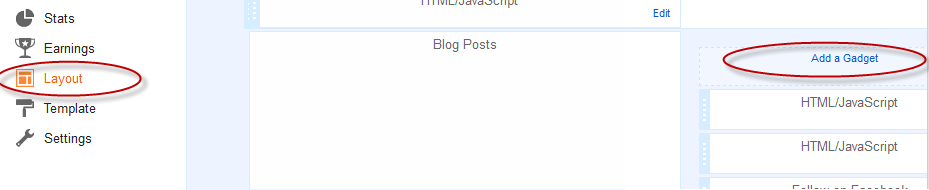
2. From the pop-up window, scroll down and click on the "HTML/JavaScript" gadget:
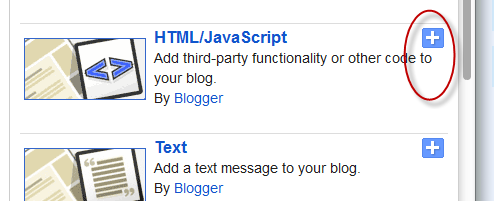
3. Paste the following code inside the empty box:
<style>
.hl-email
background:url(https://blogger.googleusercontent.com/img/b/R29vZ2xl/AVvXsEi2wn8x2XgVsffKoHAmPkSXyO_L4cJd1E45zEJNpYCZCKALwypgJILxGsj2ACffTxDxkpt8hxTYQ3zO5wy04fuUr04GhOp6po2loUdkrSTATbC9aaBJcd9fQXcP8X7_06aFVY_ZL5d4Cpo/s1600/mail.png) no-repeat 0px 12px ;
width:300px;
padding:10px 0 0 55px;
float:left;
font-size:1.4em;
font-weight:bold;
margin:0 0 10px 0;
color:#686B6C;
.hl-emailsubmit
background:#9B9895;
cursor:pointer;
color:#fff;
border:none;
padding:3px;
text-shadow:0 -1px 1px rgba(0,0,0,0.25);
-moz-border-radius:6px;
-webkit-border-radius:6px;
border-radius:6px;
font:12px sans-serif;
.hl-emailsubmit:hover
background:#E98313;
.textarea
padding:2px;
margin:6px 2px 6px 2px;
background:#f9f9f9;
border:1px solid #ccc;
resize:none;
box-shadow:inset 1px 1px 1px rgba(0,0,0,0.1);
-moz-box-shadow:inset 1px 1px 1px rgba(0,0,0,0.1);
-webkit-box-shadow:inset 1px 1px 1px rgba(0,0,0,0.1); font-size:13px;
width:130px;
color:#666;
</style>
<div class="hl-email">
Subscribe via Email <form action="http://feedburner.google.com/fb/a/mailverify" id="feedform" method="post" target="popupwindow" onsubmit="window.open('http://feedburner.google.com/fb/a/mailverify?uri=helplogger', 'popupwindow', 'scrollbars=yes,width=550,height=520');return true">
<input gtbfieldid="3" class="textarea" name="email" onblur="if (this.value == "") this.value = "Enter email address here";" onfocus="if (this.value == "Enter email address here") this.value = "";" value="Enter email address here" type="text" />
<input type="hidden" value="helplogger" name="uri"/><input type="hidden" name="loc" value="en_US"/>
<input class="hl-emailsubmit" value="Submit" type="submit" />
</form>
</div>
Settings
- Replace the url address in green to change the email icon
- To change the width or the text area, increase/decrease the 130px value in red
- replace http://feedburner.google.com/fb/a/mailverify?uri=helplogger with your Feedburner Email Feed link. You can get it by visiting your feedburner account then navigate to "Publicize" and then to "Email Subscriptions".
- Replace helplogger with your feed title. It appears at the end of your feed link. In my case it is http://feedburner.google.com/fb/a/mailverify?uri=helplogger
4. Now Save your widget and check your blog. Enjoy!

Sekian penjelasan tentang How to add “Email Subscription Form” to Blogger Blogspot semoga tulisan ini berfaedah salam
Tulisan ini diposting pada label widgets hd, widgets oppo f3 plus,


Komentar
Posting Komentar